Getting started with VoteKit
VoteKit is a Python package developed by MGGG in order to support computational social choice researchers as well as practitioners and advocates interested in so-called “alternative” systems of election. This first section will help us hit the ground running by introducing some of our key vocabulary and introducing some Python syntax along the way. By the end of the section, you should know about ballots, preference profiles, preference intervals, blocs/slates, and election systems.
Ballots
Ranked Ballots
The first order of business is ballots. In the context of ranked choice voting, a ballot records a voter’s preferences as a linear ordering of the candidates. If a voter casts the ballot \(A>B>C\), this means they prefer candidate \(A\) to \(B\) and candidate \(B\) to \(C\). (We often use the \(>\) symbol to indicate higher preference.) Let’s see how ballots are stored in VoteKit. First we import the necessary modules.
from votekit.ballot import Ballot

ballot = Ballot(ranking=[{"A"}, {"B"}, {"C"}], weight=3 / 2)
print(ballot)

ballot = Ballot(ranking=[{"A"}, {"B"}, {"C"}], weight=32)
print(ballot)
Ranking
1.) A,
2.) B,
3.) C,
Weight: 1.5
Ranking
1.) A,
2.) B,
3.) C,
Weight: 32.0
Try it yourself
Create three new ballots, one with weight 47, one with weight 22/7, and one with your own weight idea.
Let’s dig a bit more into how the ranking is stored. It is a list of sets, where the first set in the list indicates which candidates were ranked first, the second set is who was ranked second, etc. In the first example, we stored a full linear ranking. There was only one candidate listed in each position, and every candidate was listed.
# the following code should raise an error
try:
    ballot = Ballot(ranking=[{"A"}, {"B"}, {"C"}], weight=3 / 2)
    ballot.ranking = [{"C"}, {"B"}, {"A"}]

except Exception as e:
    print("You cannot change a ballot once it is created.")
    print(f"Found the following error:\n\t{e.__class__.__name__}: {e}")
You cannot change a ballot once it is created.
Found the following error:
    FrozenInstanceError: cannot assign to field 'ranking'
Full linear rankings are not the only possible ballots. Real-world voters frequently list multiple candidates in the same position (even if that is against the rules of the election). As far as we know, this is always treated by localities running ranked choice elections as a voter error, called an overvote.
Voters also leave some candidates out. In an extreme case, when a voter only lists one candidate, we call this a bullet vote. These are fairly common in ranked elections, and a position with no candidates listed is sometimes called an undervote.
We might prefer for localities running ranked choice elections to be smart about the voter intent to communicate a tied preference – and we can do that in VoteKit. But we’ll get to running elections later.
ballot = Ballot(ranking=[{"A", "D"}, {"B", "B", "B"}, {"C", "E", "F", "B"}])
print("A ballot with overvotes:", ballot)
A ballot with overvotes: Ranking
1.) D, A, (tie)
2.) B,
3.) E, B, C, F, (tie)
Weight: 1.0
The ballot above says that candidates \(D\) and \(A\) were ranked first, \(B\) second, and \(E,C,F\) all in third.
ballot = Ballot(ranking=[{"B"}])
print("A bullet vote:")
print(ballot)
A bullet vote:
Ranking
1.) B,
Weight: 1.0
The ballot above is a bullet vote; only candidate \(B\) is listed in first.
Automatic cleaning vs specified cleaning
What we really mean to illustrate above is that the Ballot class has
no understanding of the rules of your election. It is flexible enough to
allow all sorts of rankings, even ones that are not valid.
Since the ranking is a list of sets, the only default cleaning that occurs in ballots in VoteKit is that the candidates listed in a particular position will be deduplicated. In the code above, the first ballot should only print with one candidate named “B” in position two.
There are many other kinds of cleaning functions, but you have to choose to apply those yourself. This is really crucial to know; lots of elections will behave strangely if you do not have the correct ballot types as input, but it is up to you to clean them to the level needed for your method of election.
Scored Ballots
The other common ballot type is a scored ballot. In this type, each
candidate is given a score. Of course, a score induces a ranking, but we
do not automatically generate the induced ranking to 1) make the
conceptual distinction that ranked elections and scored elections are
different and 2) to give users more flexibility in the Ballot class.
ballot = Ballot(scores={"A": 4, "B": 3, "C": 4})
print(ballot)
print("ranking:", ballot.ranking)
Scores
A: 4.00
B: 3.00
C: 4.00
Weight: 1.0
ranking: None
A ballot can actually have both a ranking and a scoring of candidates,
but all of the election methods currently implemented in VoteKit
only use either the rank or score. As we see below, the ranking does not
have to agree with the scoring.
ballot = Ballot(ranking=[{"C"}, {"B"}, {"A"}], scores={"A": 4, "B": 3, "C": 4})
print(ballot)
Ranking
1.) C,
2.) B,
3.) A,
Scores
A: 4.00
B: 3.00
C: 4.00
Weight: 1.0
For the remainder of this tutorial, we will use ranked ballots.
Preference Profiles
When we want to aggregate a collection of ballots cast by voters, we use
the PreferenceProfile object. It stores all of the ballots, allows
us to visualize them, and comes with some handy features.
First we display the simple profile, which just repeats the weights as
they were inputted. Underlying the PreferenceProfile object is a
pandas DataFrame, which is what you should use to display the whole
collection of ballots in a compact format.
from votekit.pref_profile import PreferenceProfile

candidates = ["A", "B", "C"]

# let's assume that the ballots come from voters,
# so they all have integer weight for now
ballots = [
    Ballot(ranking=[{"A"}, {"B"}, {"C"}], weight=3),
    Ballot(ranking=[{"B"}, {"A"}, {"C"}]),
    Ballot(ranking=[{"C"}, {"B"}, {"A"}]),
    Ballot(ranking=[{"A"}, {"B"}, {"C"}]),
    Ballot(ranking=[{"A"}, {"B"}, {"C"}]),
    Ballot(ranking=[{"B"}, {"A"}, {"C"}]),
]

# we give the profile a list of ballots and a list of candidates
profile = PreferenceProfile(ballots=ballots, candidates=candidates)

print(profile)
print()
print(profile.df.to_string())
Profile contains rankings: True
Maximum ranking length: 3
Profile contains scores: False
Candidates: ('A', 'B', 'C')
Candidates who received votes: ('A', 'B', 'C')
Total number of Ballot objects: 6
Total weight of Ballot objects: 8.0


             Ranking_1 Ranking_2 Ranking_3 Voter Set  Weight
Ballot Index
0                  (A)       (B)       (C)        {}     3.0
1                  (B)       (A)       (C)        {}     1.0
2                  (C)       (B)       (A)        {}     1.0
3                  (A)       (B)       (C)        {}     1.0
4                  (A)       (B)       (C)        {}     1.0
5                  (B)       (A)       (C)        {}     1.0
The PreferenceProfile class takes a list of Ballot objects and a
list of candidates. The candidate names must be distinct, and it will
raise an error if not. Providing the list of candidates is actually
optional, and it has no impact on the profile object. If the candidates
are not provided, the profile automatically computes the candidates as
anyone who appeared on a ballot with positive weight. However, later
when we move on to ballot generation, the list of candidates will be
important, so it is good practice to specify them.
Notice that printing the profile did not automatically combine like ballots into a single line. But there’s an easy way to get the grouped profile, as follows.
grouped_profile = profile.group_ballots()
print(grouped_profile)
print()
print(grouped_profile.df.to_string())
Profile contains rankings: True
Maximum ranking length: 3
Profile contains scores: False
Candidates: ('A', 'B', 'C')
Candidates who received votes: ('B', 'C', 'A')
Total number of Ballot objects: 3
Total weight of Ballot objects: 8.0


             Ranking_1 Ranking_2 Ranking_3  Weight Voter Set
Ballot Index
0                  (A)       (B)       (C)     5.0        {}
1                  (B)       (A)       (C)     2.0        {}
2                  (C)       (B)       (A)     1.0        {}
In these examples, the profiles are very short, so we can print the
entire profile dataframe. If the profile was very long, we would want to
view just the head of the dataframe. If you are savvy with the pandas
library, profile.df returns a pandas DataFrame that you can use
and manipulate. If you aren’t, you can use the VoteKit functions
profile_df_head and profile_df_tail to return the top and bottom
ballots by weight.
from votekit.pref_profile import profile_df_head
ballots = [
    Ballot(ranking=[{"A"}, {"B"}, {"C"}]),
    Ballot(ranking=[{"B"}, {"A"}, {"C"}]),
    Ballot(ranking=[{"C"}, {"B"}, {"A"}]),
    Ballot(ranking=[{"A"}]),
    Ballot(ranking=[{"A"}, {"B"}, {"C"}]),
    Ballot(ranking=[{"B"}, {"A"}]),
]

profile = PreferenceProfile(ballots=ballots * 6, candidates=candidates)

print(profile)
print()
print(profile_df_head(profile, 10))
Profile contains rankings: True
Maximum ranking length: 3
Profile contains scores: False
Candidates: ('A', 'B', 'C')
Candidates who received votes: ('A', 'B', 'C')
Total number of Ballot objects: 36
Total weight of Ballot objects: 36.0


             Ranking_1 Ranking_2 Ranking_3 Voter Set  Weight
Ballot Index
0                  (A)       (B)       (C)        {}     1.0
1                  (B)       (A)       (C)        {}     1.0
20                 (C)       (B)       (A)        {}     1.0
21                 (A)       (~)       (~)        {}     1.0
22                 (A)       (B)       (C)        {}     1.0
23                 (B)       (A)       (~)        {}     1.0
24                 (A)       (B)       (C)        {}     1.0
25                 (B)       (A)       (C)        {}     1.0
26                 (C)       (B)       (A)        {}     1.0
27                 (A)       (~)       (~)        {}     1.0
The ~ symbols indicate that the end of a ranking, i.e. the voter
stopped ranking candidates. It is a reserved character for the
underlying dataframe, so you can never make a candidate name just a
~.
If we wanted to indicate that a voter skipped a position, we would do so with an empty set in the ballot, which would look like this.
ballot_1 = Ballot(ranking=({"A"}, set(), {"C"})) # a skipped position
ballot_2 = Ballot(ranking=({"A"}, {"D"})) # a ballot that left off one possible ranking

profile = PreferenceProfile(ballots=(ballot_1, ballot_2), max_ranking_length= 3)

print(profile.df)
             Ranking_1 Ranking_2 Ranking_3 Voter Set  Weight
Ballot Index
0                  (A)        ()       (C)        {}     1.0
1                  (A)       (D)       (~)        {}     1.0
profile_df_head and tail come with some helpful parameters.
Try it yourself
Play with the parameters in the function below to see what they do.
ballots = [
    Ballot(ranking=[{"A"}, {"B"}, {"C"}]),
    Ballot(ranking=[{"B"}, {"A"}, {"C"}]),
    Ballot(ranking=[{"C"}, {"B"}, {"A"}]),
    Ballot(ranking=[{"A"}]),
    Ballot(ranking=[{"A"}, {"B"}, {"C"}]),
    Ballot(ranking=[{"B"}, {"A"}]),
]

profile = PreferenceProfile(ballots=ballots * 6, candidates=candidates)
profile_df_head(profile, 10, sort_by_weight=False, percents=True, totals=True, n_decimals=3)
| Ranking_1 | Ranking_2 | Ranking_3 | Voter Set | Weight | Percent | |
|---|---|---|---|---|---|---|
| Ballot Index | ||||||
| 0 | (A) | (B) | (C) | {} | 1.0 | 2.778% |
| 1 | (B) | (A) | (C) | {} | 1.0 | 2.778% |
| 2 | (C) | (B) | (A) | {} | 1.0 | 2.778% |
| 3 | (A) | (~) | (~) | {} | 1.0 | 2.778% |
| 4 | (A) | (B) | (C) | {} | 1.0 | 2.778% |
| 5 | (B) | (A) | (~) | {} | 1.0 | 2.778% |
| 6 | (A) | (B) | (C) | {} | 1.0 | 2.778% |
| 7 | (B) | (A) | (C) | {} | 1.0 | 2.778% |
| 8 | (C) | (B) | (A) | {} | 1.0 | 2.778% |
| 9 | (A) | (~) | (~) | {} | 1.0 | 2.778% |
| Total | 10.0 | 27.778% |
You can also do most of these with the pandas DataFrame methods.
# this will print the top 8 in order of input
print(profile.df.head(8))
print()

# and the bottom 8
print(profile.df.tail(8))
print()

# and the entry indexed 10, which includes the percent of the profile
# this ballot accounts for
print(profile.df.iloc[10])
print()

# condense and sort by by weight
condensed_profile = profile.group_ballots()
print(condensed_profile.df.head(8).sort_values(by="Weight", ascending=False))
             Ranking_1 Ranking_2 Ranking_3 Voter Set  Weight
Ballot Index
0                  (A)       (B)       (C)        {}     1.0
1                  (B)       (A)       (C)        {}     1.0
2                  (C)       (B)       (A)        {}     1.0
3                  (A)       (~)       (~)        {}     1.0
4                  (A)       (B)       (C)        {}     1.0
5                  (B)       (A)       (~)        {}     1.0
6                  (A)       (B)       (C)        {}     1.0
7                  (B)       (A)       (C)        {}     1.0

             Ranking_1 Ranking_2 Ranking_3 Voter Set  Weight
Ballot Index
28                 (A)       (B)       (C)        {}     1.0
29                 (B)       (A)       (~)        {}     1.0
30                 (A)       (B)       (C)        {}     1.0
31                 (B)       (A)       (C)        {}     1.0
32                 (C)       (B)       (A)        {}     1.0
33                 (A)       (~)       (~)        {}     1.0
34                 (A)       (B)       (C)        {}     1.0
35                 (B)       (A)       (~)        {}     1.0

Ranking_1    (A)
Ranking_2    (B)
Ranking_3    (C)
Voter Set     {}
Weight       1.0
Name: 10, dtype: object

             Ranking_1 Ranking_2 Ranking_3  Weight Voter Set
Ballot Index
0                  (A)       (B)       (C)    12.0        {}
1                  (A)       (~)       (~)     6.0        {}
2                  (B)       (A)       (C)     6.0        {}
3                  (B)       (A)       (~)     6.0        {}
4                  (C)       (B)       (A)     6.0        {}
A few other useful attributes/methods are listed here. Use
profile.ATTR for each one.
candidatesreturns the list of candidates input to the profile.candidates_castreturns the list of candidates who received votes.ballotsreturns the list of ballots (useful if you want to extract the ballots to write custom code, say).num_ballotsreturns the number of ballots, which is the length ofballots.total_ballot_wtreturns the sum of the ballot weights.to_pickle(fpath = "name_of_file.pkl")saves the profile as a pkl (useful if you want to replicate runs of an experiment).
Try it yourself
Try using all of the above attributes/methods, with or without grouping the ballots.
Preference Intervals
There are a few ways to input ballots into VoteKit. You can type them all by hand as we did above, you can read them in from real-world vote records, or you can generate them within VoteKit. While we will dive a lot deeper into reading and generating in future sections, it is worthwhile to introduce some of the vocabulary surrounding generative models here.
Most of our generative models rely on a preference interval. A preference interval stores information about the relative strengths of a voter’s priorities for candidates. We visualize this, unsurprisingly, as an interval. We take the interval \([0,1]\) and divide it into pieces, where we’ve taken all the preference weights and scaled so they add to 1.
For example,
{"A": 0.7, "B": 0.2, "C": 0.1}
is a dictionary that represents an ordered preference interval where A is preferred to B by a ratio of 7:2, etc.
Later, the ballot generator models will pull from these preferences to create a ballot for each voter.
It should be remarked that there is a difference, at least to VoteKit, between the intervals
{"A": 0.7, "B": 0.3, "C": 0} and
{"A": 0.7, "B": 0.3}
While both say there is no preference for candidate C, if the latter interval is fed into VoteKit, that third candidate will never appear on a generated ballot. If we feed it the former interval, the third candidate will appear at the bottom of the ballot.
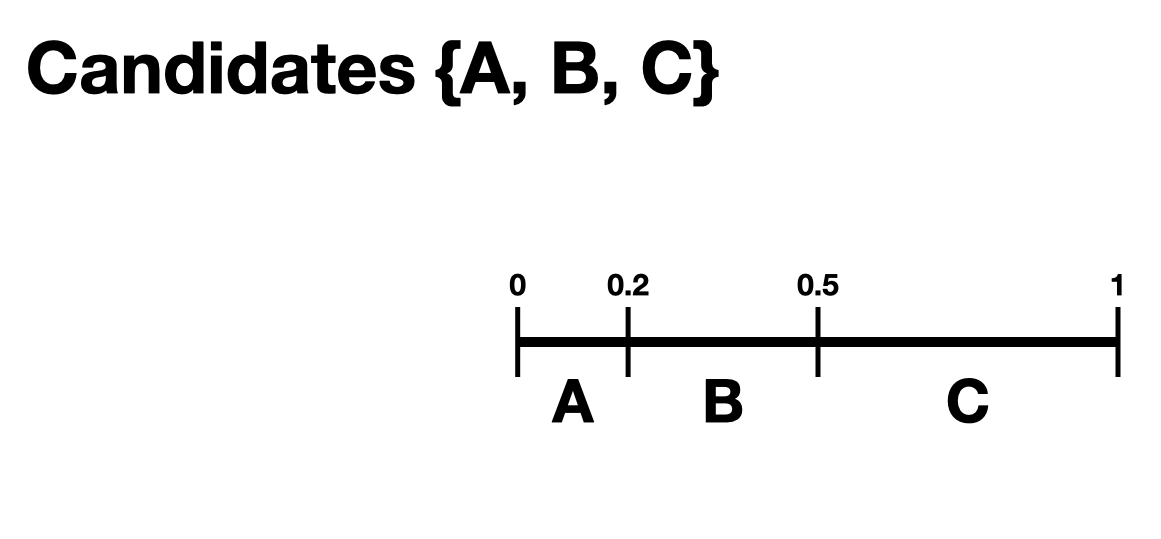
One of the generative models is called the slate-Plackett-Luce model, or s-PL. In s-PL, voters fill in their ballot from the top position to the bottom by choosing from the available candidates in proportion to their preference weights. We call this the impulsive voter model.
You can read more about s-PL in our social choice documentation, but for now let’s use it to explore how intervals work. We will assume there is only one bloc of voters. This makes the syntax look a little strange, but bear with us.
import votekit.ballot_generator as bg
from votekit import PreferenceInterval

# the sPL model assumes there are blocs of voters,
# but we can just say that there is only one bloc
bloc_voter_prop = {"all_voters": 1}
slate_to_candidates = {"all_voters": ["A", "B", "C"]}

# the preference interval (80,15,5)
pref_intervals_by_bloc = {
    "all_voters": {"all_voters": PreferenceInterval({"A": 0.80, "B": 0.15, "C": 0.05})}
}

# the sPL model needs an estimate of cohesion between blocs,
# but there is only one bloc here
cohesion_parameters = {"all_voters": {"all_voters": 1}}

pl = bg.slate_PlackettLuce(
    pref_intervals_by_bloc=pref_intervals_by_bloc,
    bloc_voter_prop=bloc_voter_prop,
    slate_to_candidates=slate_to_candidates,
    cohesion_parameters=cohesion_parameters,
)

profile = pl.generate_profile(number_of_ballots=100)
print(profile.df)
             Ranking_1 Ranking_2 Ranking_3 Voter Set  Weight
Ballot Index
0                  (A)       (B)       (C)        {}    67.0
1                  (A)       (C)       (B)        {}    21.0
2                  (B)       (C)       (A)        {}     2.0
3                  (B)       (A)       (C)        {}     9.0
4                  (C)       (B)       (A)        {}     1.0
Re-run the above block several times to see that the elections will come
out different! The s-PL model is random, meaning we won’t always get the
same profile when we run generate_profile (although we are planning
to implement an explicit random seed option so that you can
replicate runs). You probably won’t get the same output as what is
stored in this tutorial either. That’s okay! Check that most ballots
rank \(A\) first, which is expected because they had the largest
portion of the preference interval. Likewise, \(C\) is least
popular.
Blocs
A bloc of voters is a group of voters who have similar voting behavior, generally preferring their slate of candidates to the slates associated to other blocs. In VoteKit, we model this by assuming voters within a bloc have the same preference interval. Let’s look at an example where there are two blocs called Alpha and Xenon, each with a two-candidate slate (\(A,B\) and \(X,Y\), respectively).
By introducing blocs, we also need to discuss cohesion parameters. In realistic polarized elections, we might be able to identify two groups with different voting tendencies, but real voting blocs are not perfectly monolithic—some voters will stick with their slate, but many others might have a tendency to “cross over” to the other slate sometimes in constructing their ballot.
The precise meaning of these vary by model, but broadly speaking, cohesion parameters measure the strength with which voters within a particular bloc stick to their slate.
slate_to_candidates = {"Alpha": ["A", "B"], "Xenon": ["X", "Y"]}

# note that we include candidates with 0 support,
# and that our preference intervals will automatically rescale to sum to 1

pref_intervals_by_bloc = {
    "Alpha": {
        "Alpha": PreferenceInterval({"A": 0.8, "B": 0.2}),
        "Xenon": PreferenceInterval({"X": 0, "Y": 1}),
    },
    "Xenon": {
        "Alpha": PreferenceInterval({"A": 0.5, "B": 0.5}),
        "Xenon": PreferenceInterval({"X": 0.5, "Y": 0.5}),
    },
}


bloc_voter_prop = {"Alpha": 0.8, "Xenon": 0.2}

# assume that each bloc is 90% cohesive
# we'll discuss exactly what that means later
cohesion_parameters = {
    "Alpha": {"Alpha": 0.9, "Xenon": 0.1},
    "Xenon": {"Xenon": 0.9, "Alpha": 0.1},
}

pl = bg.slate_PlackettLuce(
    pref_intervals_by_bloc=pref_intervals_by_bloc,
    bloc_voter_prop=bloc_voter_prop,
    slate_to_candidates=slate_to_candidates,
    cohesion_parameters=cohesion_parameters,
)

# the by_bloc parameter allows us to see which ballots came from which blocs of voters
profile_dict, agg_profile = pl.generate_profile(number_of_ballots=10000, by_bloc=True)
print("The ballots from Alpha voters\n", profile_dict["Alpha"].df)

print("The ballots from Xenon voters\n", profile_dict["Xenon"].df)

print("Aggregated ballots\n", agg_profile.df)
The ballots from Alpha voters
              Ranking_1 Ranking_2 Ranking_3 Ranking_4  Weight Voter Set
Ballot Index
0                  (A)       (B)       (Y)       (X)  5171.0        {}
1                  (A)       (Y)       (B)       (X)   562.0        {}
2                  (B)       (Y)       (A)       (X)   142.0        {}
3                  (B)       (A)       (Y)       (X)  1298.0        {}
4                  (Y)       (B)       (A)       (X)   159.0        {}
5                  (Y)       (A)       (B)       (X)   668.0        {}
The ballots from Xenon voters
              Ranking_1 Ranking_2 Ranking_3 Ranking_4  Weight Voter Set
Ballot Index
0                  (Y)       (X)       (A)       (B)   427.0        {}
1                  (Y)       (X)       (B)       (A)   416.0        {}
2                  (Y)       (A)       (B)       (X)     4.0        {}
3                  (Y)       (A)       (X)       (B)    39.0        {}
4                  (Y)       (B)       (A)       (X)     6.0        {}
5                  (Y)       (B)       (X)       (A)    37.0        {}
6                  (X)       (Y)       (A)       (B)   369.0        {}
7                  (X)       (Y)       (B)       (A)   406.0        {}
8                  (X)       (A)       (B)       (Y)     3.0        {}
9                  (X)       (A)       (Y)       (B)    57.0        {}
10                 (X)       (B)       (A)       (Y)     2.0        {}
11                 (X)       (B)       (Y)       (A)    45.0        {}
12                 (B)       (X)       (A)       (Y)     8.0        {}
13                 (B)       (X)       (Y)       (A)    39.0        {}
14                 (B)       (Y)       (A)       (X)     3.0        {}
15                 (B)       (Y)       (X)       (A)    35.0        {}
16                 (B)       (A)       (Y)       (X)     3.0        {}
17                 (B)       (A)       (X)       (Y)     5.0        {}
18                 (A)       (X)       (B)       (Y)     6.0        {}
19                 (A)       (X)       (Y)       (B)    39.0        {}
20                 (A)       (Y)       (B)       (X)     8.0        {}
21                 (A)       (Y)       (X)       (B)    32.0        {}
22                 (A)       (B)       (Y)       (X)     8.0        {}
23                 (A)       (B)       (X)       (Y)     3.0        {}
Aggregated ballots
              Ranking_1 Ranking_2 Ranking_3 Ranking_4 Voter Set  Weight
Ballot Index
0                  (A)       (B)       (Y)       (X)        {}  5171.0
1                  (A)       (Y)       (B)       (X)        {}   562.0
2                  (B)       (Y)       (A)       (X)        {}   142.0
3                  (B)       (A)       (Y)       (X)        {}  1298.0
4                  (Y)       (B)       (A)       (X)        {}   159.0
5                  (Y)       (A)       (B)       (X)        {}   668.0
6                  (Y)       (X)       (A)       (B)        {}   427.0
7                  (Y)       (X)       (B)       (A)        {}   416.0
8                  (Y)       (A)       (B)       (X)        {}     4.0
9                  (Y)       (A)       (X)       (B)        {}    39.0
10                 (Y)       (B)       (A)       (X)        {}     6.0
11                 (Y)       (B)       (X)       (A)        {}    37.0
12                 (X)       (Y)       (A)       (B)        {}   369.0
13                 (X)       (Y)       (B)       (A)        {}   406.0
14                 (X)       (A)       (B)       (Y)        {}     3.0
15                 (X)       (A)       (Y)       (B)        {}    57.0
16                 (X)       (B)       (A)       (Y)        {}     2.0
17                 (X)       (B)       (Y)       (A)        {}    45.0
18                 (B)       (X)       (A)       (Y)        {}     8.0
19                 (B)       (X)       (Y)       (A)        {}    39.0
20                 (B)       (Y)       (A)       (X)        {}     3.0
21                 (B)       (Y)       (X)       (A)        {}    35.0
22                 (B)       (A)       (Y)       (X)        {}     3.0
23                 (B)       (A)       (X)       (Y)        {}     5.0
24                 (A)       (X)       (B)       (Y)        {}     6.0
25                 (A)       (X)       (Y)       (B)        {}    39.0
26                 (A)       (Y)       (B)       (X)        {}     8.0
27                 (A)       (Y)       (X)       (B)        {}    32.0
28                 (A)       (B)       (Y)       (X)        {}     8.0
29                 (A)       (B)       (X)       (Y)        {}     3.0
Scan this to be sure it is reasonable, recalling that our intervals say that the Alpha voters prefer \(A\) to \(B\), while \(X\) has no support in that bloc. Xenon voters like \(X\) and \(Y\) equally, and then like \(A\) and \(B\) equally (although much less than their own slate). There should be a lot more Alpha-style voters than Xenon-style voters.
Elections
Finally, we are ready to run an election. It is important to distinguish between preference profiles, which are a collection of ballots, and elections, which are the method by which those ballots are converted to an outcome (candidates elected to seats). We will explore all sorts of election types in later notebooks. For now, let’s use a plurality election on a small set of ballots so we can verify that it behaves as it should.
from votekit.elections import Plurality

ballots = [
    Ballot(ranking=[{"A"}, {"B"}, {"C"}]),
    Ballot(ranking=[{"B"}, {"A"}, {"C"}]),
    Ballot(ranking=[{"C"}, {"B"}, {"A"}]),
    Ballot(ranking=[{"A"}, {"B"}, {"C"}]),
    Ballot(ranking=[{"A"}, {"B"}, {"C"}]),
    Ballot(ranking=[{"B"}, {"A"}, {"C"}]),
]

profile = PreferenceProfile(ballots=ballots * 6, candidates=candidates)

profile = profile.group_ballots()

print(profile.df)

# m is the number of seats to elect
election = Plurality(profile=profile, m=1)

print(election)
             Ranking_1 Ranking_2 Ranking_3  Weight Voter Set
Ballot Index
0                  (A)       (B)       (C)    18.0        {}
1                  (B)       (A)       (C)    12.0        {}
2                  (C)       (B)       (A)     6.0        {}
      Status  Round
A    Elected      1
B  Remaining      1
C  Remaining      1
If everything worked as intended, you should see that \(A\) was elected, while \(B,C\) were remaining. There is only one round, as plurality elections are single step.
You can also run a plurality election with more seats than one; it just takes the \(m\) candidates with the most first-place support as winners.
For advanced users: if several candidates had the same level of
first-place support, the default tiebreaker in VoteKit is None, and
it will raise an error telling you to choose a tiebreak method. This can
be done by setting tiebreak='random' or tiebreak='borda' in the
Plurality init method. There is also a 'first_place' option, but
that won’t help in a plurality tie.
Conclusion
The goal of this section was to introduce the vocabulary of VoteKit and ranked choice voting. You should now know about ballots, preference profiles, preference intervals, blocs/slates, and the distinction between profiles and elections.
Extra Prompts
If you have finished this section and are looking to extend your understanding, try the following prompts:
Write your own profile with four candidates named Trump, Rubio, Cruz, and Kasich, a preference interval of your choice, and with the bloc name set to “Repubs2016”. Generate 1000 ballots. Are they distributed how they should be given your preference interval?
Create a preference profile where candidates \(B,C\) should be elected under a 2-seat plurality election. Run the election and confirm!